Android, iPhone, iPad and Windows

A Minecraft Bedrock server for phone and PC players

Bedrock is the Minecraft edition for phones, tablets and Windows. Your friends join your server with an address and a port, and it updates itself when it restarts.

See the plans From €3.99/month
A phone, a tablet and a laptop around a Minecraft grass block, the same world on every screen
  • Add-ons and packs
  • Updates on restart
  • Files and SFTP
  • Backups

Mojang's official Bedrock server, managed from the panel.

Four plans, from 6 GB to 32 GB of RAM

Start is enough for a world with friends: the Bedrock server needs little memory. Take more RAM for a large community, heavy add-ons or a public server.

RECOMMENDED
Redstone dust Perfect to get started

Start

6 GB RAM

Unlimited slots

A world with friends, with add-ons

€3.99
/month
6 GB RAM
4 vCPU
High-frequency Xeon
Unlimited NVMe storage
Minecraft Game Anti-DDoS
Order Start
Gold ingot Large community

Plugins

12 GB RAM

Unlimited slots

More players, heavy add-ons

€8.99
/month
12 GB RAM
6 vCPU
High-frequency Xeon
Unlimited NVMe storage
Minecraft Game Anti-DDoS
Order Plugins
Emerald Most popular

Modded

24 GB RAM

Unlimited slots

Public server, very large worlds

€18.99
/month
24 GB RAM
8 vCPU
High-frequency Xeon
Unlimited NVMe storage
Minecraft Game Anti-DDoS
Order Modded
Diamond Maximum power

Modpack

32 GB RAM

Unlimited slots

The most RAM and priority support

€24.99
/month
32 GB RAM
10 vCPU
High-frequency Xeon
Unlimited NVMe storage
Priority support + Livemap
Order Modpack
Secure payment Visa & Mastercard Apple Pay PayPal Paysafecard

Settings and add‑ons from the panel

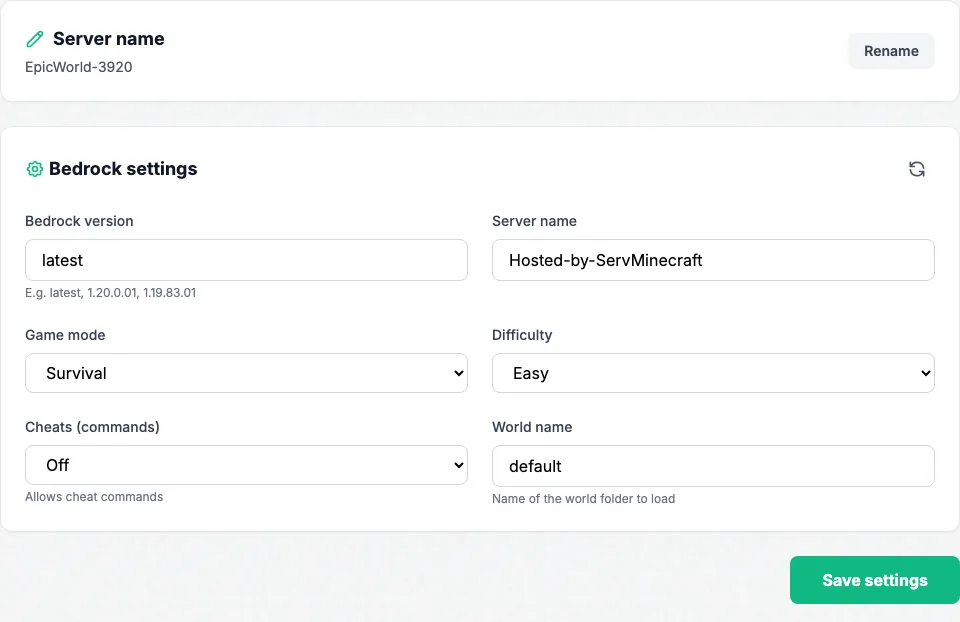
The Settings tab sets the game mode, difficulty, cheats and the world to load. The Add-ons tab walks you through installing a behavior or resource pack, and turns on the Beta APIs when an add-on needs them.

Left on latest, the server installs Mojang's newest version every time it restarts, without touching your worlds. Need a specific version? Enter its number in Settings.

Settings tab of a Bedrock server in the panel: version, game mode, difficulty, cheats and world

Crossplay: phone, tablet and PC together

On a Bedrock server, players on phones, tablets and Windows PCs already play together, with nothing to install. Java players, however, cannot connect to it.

Part of your group plays Java? Go for a Java server with Geyser: it is the right base for a Java and Bedrock crossplay server, and Bedrock players join it from their phone or PC, without a Java account.

The crossplay Java server, with Geyser
A computer player and a phone player in the same world, linked by the server
Trustpilot Read the reviews
Tom

Setup is quick, the interface is easy to understand and the server is stable, even with several players. I haven't run into any noticeable lag.

AllanYT_

Honestly guys, go for it with your eyes closed, the support is super responsive and the value for money is great!

Yannis Coelho

I've been hosting my Minecraft server for 2 years for my community and I have nothing to complain about: attentive support and a stable server, with no bugs or crashes.

Noltox_PVP

Everything is perfect, 0 lag and great value for money. I recommend it!

_Zheyko_

My Minecraft server works great.

Bedrock server questions

Which devices can join a Bedrock server?
Android, iPhone, iPad and Windows PCs. Consoles (Xbox, PlayStation, Switch) cannot add an external server directly.
How do my friends connect?
In Minecraft: Play, Servers, Add Server. The address goes in the first field and the port in the second. Both are shown in the panel's Console tab.
How do I install an add-on?
Rename the .mcaddon or .mcpack file to .zip, unzip it, upload the behavior pack to behavior_packs and the resource pack to resource_packs, then register them in the world. The panel's Add-ons tab walks you through each step.
Does the server follow Minecraft updates?
Yes. Set to latest, which is the default, it installs Mojang's newest version every time it restarts. Restart it after a game update, or your friends get turned away with an "outdated server" message.
How do I keep the server to my friends only?
In the console, add each player with allowlist add followed by their Xbox gamertag, then turn on allow-list in server.properties.
Is a Bedrock server crossplay?
Between Bedrock devices, yes: phones, tablets and Windows PCs play together on the same server. Java players cannot connect to it, though. To mix Java and Bedrock, take a Java server with Geyser: Bedrock players can join it too.

Worth reading before you order

Your Bedrock server online in 60 seconds

Pick a plan, pay, and the server starts. No commitment.

Create my Bedrock server

Talk to an expert

Tell us about your project, we will suggest the right plan.

Reply by email

7 days a week support. No sales calls.

Join the Discord
Loading page