Forge, Fabric & modpacks

A modded Minecraft server, ready to play

Forge, Fabric, large modpacks: our Modded and Modpack plans are built to handle the most demanding mods. Installation is done from the panel, with no command line or manual configuration.

Modded Minecraft server Dedicated server

Who are the modded plans for?

A modded server has nothing to do with a vanilla server, or even a plugin server: every mod adds entities, blocks, recipes and calculations that weigh on RAM and CPU. Our two modded plans target two different profiles. The Modded plan, with 24 GB of RAM, suits a group of friends who want to play on a medium-sized modpack: Create, Cobblemon, or a lightweight All The Mods, and more broadly any modpack that runs comfortably with a few dozen mods. The Modpack plan, with 32 GB of RAM, is aimed at large communities and heavy modpacks: many players connected at the same time, many chunks loaded, mods that simulate a huge number of entities. It also includes priority support and Livemap, useful for running an active community.

How much RAM for which modpack?

There is no universal figure: the RAM you need depends above all on the modpack itself, the number of connected players and the number of chunks explored. A few careful guidelines to help you decide. A light to medium modpack, with a few dozen mods and little custom terrain generation, generally runs well on the 24 GB of the Modded plan for a small group. A large modpack, with many mods, custom terrain generation and a large community, benefits from the 32 GB of the Modpack plan. In every case, the modpack's page on CurseForge or Modrinth lists a recommended RAM from its authors: that is the best starting point before choosing your plan.

Installing Forge or Fabric from the panel

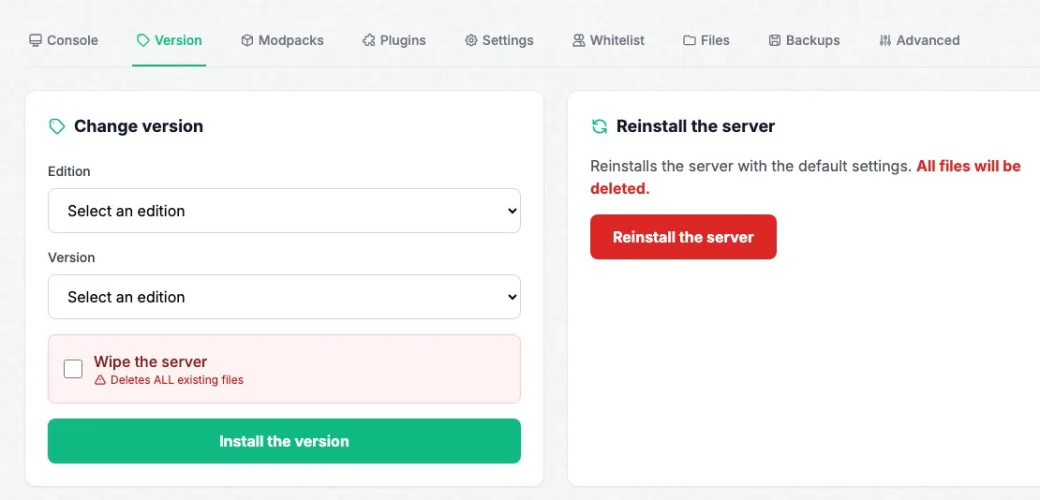
No need to get into a configuration file to launch a modded server. From your server page, the panel's Version tab lets you choose the edition (Forge or Fabric) and the matching Minecraft version: the server restarts with the right files within minutes. For a ready-made modpack, the Modpacks tab goes further: search for the pack by name, select the version you want and launch the install. The mods and their dependencies are installed automatically, without downloading them one by one. You can then fine-tune your configuration (mod files, whitelist, backups) directly from the panel's other tabs.

Installing a modpack from the panel

Why host your modpack with us

A modpack stresses the CPU differently than a vanilla server: lots of single-thread calculations, automations running continuously, sometimes dozens of entities simulated at once. Our servers run on high-frequency Xeon processors, built for this type of load, with NVMe drives that speed up chunk and world loading on startup. Anti-DDoS Game protection, specific to the Minecraft protocol, absorbs targeted attacks without penalizing legitimate players. Everything runs in our own datacenters in France, with no middleman.

Plans for a modded server

High-frequency processors, NVMe drives and Anti-DDoS Game Minecraft protection included on both plans. No commitment, instant activation.

⚙️ Forge & Fabric

Modded

Medium modpacks: Create, ATM, Cobblemon…

€15.99
/month
24 GB RAM
High-frequency Xeon
NVMe storage
Minecraft Game Anti-DDoS
Order Modded
🔥 Maximum power

Modpack

Heavy modpacks and large communities

€21.99
/month
32 GB RAM
High-frequency Xeon
NVMe storage
Priority support + Livemap
Order Modpack

Frequently asked questions

How much RAM should I choose for a Minecraft modpack?
It depends on the modpack and the number of players. For a light to medium modpack between friends, the 24 GB of the Modded plan is usually enough. For a large modpack or a big community, better to go with the 32 GB of the Modpack plan. Always check the recommended RAM on the modpack's page (CurseForge, Modrinth).
How do I install Forge or Fabric on my server?
From the panel's Version tab, choose the edition (Forge or Fabric) and the Minecraft version you want. The server restarts automatically with the right files, with no further steps.
Can I change modpack after creating my server?
Yes, from the Modpacks tab. Note, however, that installing a new modpack may require resetting the world, so remember to make a backup before changing.
Is Expert mode useful for a modded server?
Yes, if you want to fine-tune the configuration beyond what the standard interface offers. It is enabled from the panel settings with a dedicated password.

Also worth reading

Go further

Ready to launch your modpack?

Order your modded server in a few minutes, with no commitment.

Order my modded server