Plugins, mods or the official game: you pick the software and the version from the panel, and change them whenever you like. Friends who play Bedrock can join you too, through Geyser.
Paper or Purpur for plugins, Fabric or Forge for mods, and Geyser to let Bedrock players in.
All of them run Java, with or without mods. If your server grows, you switch plans from the panel.
6 GB RAM
Unlimited slots
Vanilla, Paper, SMP with friends
12 GB RAM
Unlimited slots
Paper / Spigot, plugins, mini-games
24 GB RAM
Unlimited slots
Medium modpacks: Create, ATM, Cobblemon…
32 GB RAM
Unlimited slots
Heavy modpacks and large communities
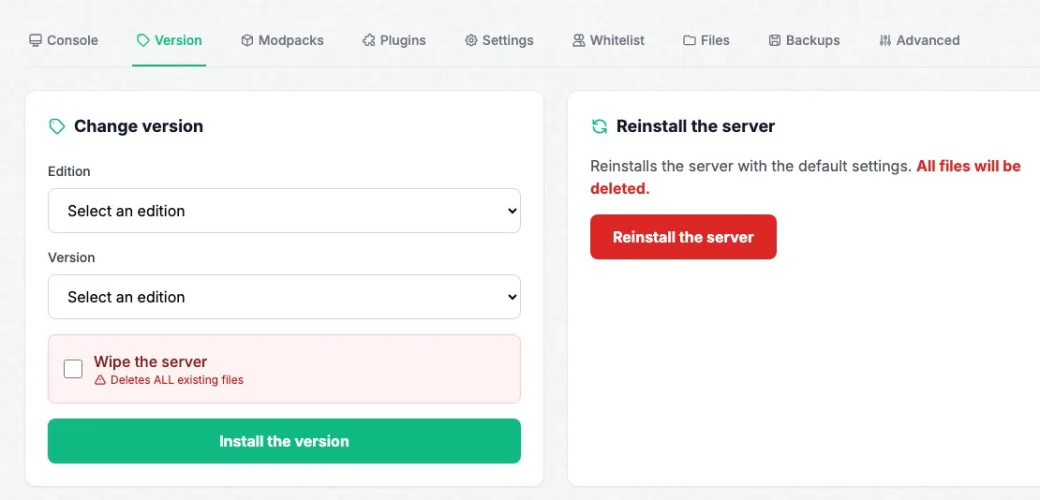
In the Version tab, choose the edition (Paper, Purpur, Fabric, Forge, NeoForge or Vanilla), then the version, and install. Your world stays in place as long as Wipe the server is left unticked.
A new Minecraft version is out? Update when your plugins or mods are ready, not before, and take a backup: going back to an older version often damages a world.
With Geyser and Floodgate, your Java Paper server becomes crossplay: Bedrock players (phone, tablet, Windows PC) join the same world as you, without a Java account.
Geyser needs an extra port: open a ticket and support adds it to your server. Then install both plugins from the Plugins tab.
The step-by-step Geyser guide
I've been hosting my Minecraft server for 2 years for my community and I have nothing to complain about: attentive support and a stable server, with no bugs or crashes.
Setup is quick, the interface is easy to understand and the server is stable, even with several players. I haven't run into any noticeable lag.
Perfect for running my modded server! The modpack installer is a real plus.
Honestly guys, go for it with your eyes closed, the support is super responsive and the value for money is great!
Works great to play with my friends on a very heavy modpack (GT New Horizons)!!
Everything is perfect, 0 lag and great value for money. I recommend it!
Pick a plan, pay, and the server starts. No commitment.
Create my Java server